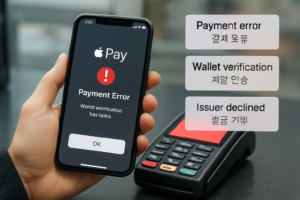
If you are searching for apple pay down, you probably need an answer immediately: is Apple Pay having a system-wide outage, or is the problem limited to your phone, card, bank, or store terminal? In many cases, Apple Pay failures are temporary and can be fixed in a few minutes. But when alerts, bank notices, or customer support messages appear only in English, Korean-speaking users may have trouble understanding what to do next.
This guide is designed for real-time troubleshooting. It explains the most common reasons Apple Pay may stop working and translates important support terms such as payment error, wallet services, and bank verification into practical Korean-friendly explanations.
1. First: Is Apple Pay really down?
Before changing settings, check whether the issue is widespread. Search recent reports on social media, outage trackers, or official service pages. If many users are reporting the same problem, the keyword apple pay down may reflect a real service disruption.
- Apple Pay down: Apple Pay service may be temporarily unavailable
- Wallet services unavailable: Wallet-related functions are not working normally
- Payment error: A payment attempt failed
- Issuer declined transaction: The card-issuing bank rejected the payment
If there is no confirmed outage, the issue may be local: your device, your card, your network, or the merchant terminal.
2. Check your iPhone basics
A surprising number of Apple Pay errors come from simple device conditions. Review these first:
- Restart your iPhone. Temporary software glitches can interrupt NFC payments.
- Update iOS. An outdated version may affect Wallet or payment authentication.
- Confirm Face ID or Touch ID is working. If biometric authentication fails, Apple Pay may not complete.
- Make sure region and date/time settings are correct. Incorrect device settings can interfere with secure verification.
- Check that Wallet is enabled. Open Settings and confirm your wallet and card options are active.
If your phone recently changed language, region, SIM card, or Apple ID settings, Apple Pay may require new verification.
3. Review wallet verification status
One of the most common hidden causes behind apple pay down searches is not an outage at all, but incomplete card verification. In the Wallet app, tap your card and look for warnings or pending actions.
Common messages include:
- Verification Required – 카드 인증 필요
- Contact Your Card Issuer – 카드 발급사에 문의하세요
- Card Not Available for Apple Pay – 해당 카드는 Apple Pay 사용 불가
- Payment Not Completed – 결제가 완료되지 않음
If you see a verification message, your bank may need to confirm your identity by text message, app notification, phone call, or secure login. This is often described as bank verification or issuer authentication. If the bank’s message is in English, users may miss an urgent action request.
4. Check with your card issuer or bank
Even when Apple Pay itself is working, your bank may block a transaction for security reasons. This is especially common after overseas travel, a new device setup, unusual spending, or repeated failed attempts.
Ask your bank these questions:
- Is my card active for Apple Pay?
- Was my transaction declined by the issuer?
- Do I need to re-verify my card in Wallet?
- Is there a fraud alert or spending restriction on my account?
Important support phrases:
- Issuer declined – 카드사 승인 거절
- Suspicious activity detected – 의심 거래 감지
- Please verify your identity – 본인 확인이 필요합니다
- Your card has been temporarily restricted – 카드가 일시 제한되었습니다
For Korean-speaking customers, bilingual support matters here. A short misunderstanding in a fraud alert or verification notice can delay payment, travel, medical appointments, or legal services.
5. Test your network and Apple ID session
Although in-store Apple Pay uses NFC, some wallet functions still depend on a healthy device session, internet access, and Apple account communication. If you are seeing repeated setup or verification errors:
- Switch between Wi-Fi and mobile data
- Turn Airplane Mode on and off
- Sign out and back into Apple ID only if necessary and only after checking card access implications
- Disable VPN temporarily if it may interfere with regional services
If your wallet cannot refresh card status, the issue may look like apple pay down even when the real problem is connectivity.
6. The store terminal may be the problem
Sometimes your phone and card are fine, but the merchant’s payment terminal is not accepting contactless transactions. This is common when:
- The NFC reader is offline
- The terminal software is outdated
- The cashier selected the wrong payment mode
- The store accepts cards but not mobile wallet tap payments for that transaction type
Useful English phrases you may hear at a store:
- The reader is down – 단말기가 작동하지 않음
- Tap to pay is unavailable – 비접촉 결제 사용 불가
- Please insert or swipe your card – 카드를 꽂거나 긁어 주세요
- Try another payment method – 다른 결제 수단을 시도해 주세요
When users search apple pay down, they often assume Apple is the cause, but retail hardware failure is a frequent reason.
7. Fast step-by-step troubleshooting checklist
- Check whether Apple Pay is broadly down or only failing for you.
- Restart your iPhone and confirm iOS is updated.
- Open Wallet and review card verification alerts.
- Try a different card in Apple Pay if available.
- Test at another store or terminal.
- Check bank app alerts, text messages, and email notices.
- Contact your card issuer and ask whether the transaction was declined.
- Use an alternative payment method while the issue is being resolved.
8. Best alternative payment methods
If apple pay down is affecting your purchase right now, do not wait too long at checkout. Prepare a backup:
- Physical credit or debit card
- Another mobile wallet
- Cash
- Bank app card number access for online payment
- A second verified card already saved in Wallet
For urgent situations such as hospital registration, pharmacy pickup, transportation, or legal document processing, a backup payment method is essential.
9. Why bilingual support matters in payment emergencies
Payment failures are not only technical issues. They are communication issues. A user may receive an English-only message saying verification failed, issuer review required, or wallet services unavailable and not know whether the problem is with Apple, the bank, the card, or the store.
This is where bilingual customer support, translation, and interpretation become important. In finance, telecommunications, healthcare, and legal settings, users often need fast and accurate explanation of service notices, fraud warnings, identity checks, and payment restrictions. Clear Korean-English communication reduces confusion, prevents repeat errors, and helps customers act quickly.
For brands and service providers, this trend also shows a larger opportunity: real-time technical support content should not be English-only. Bilingual guidance improves trust, accessibility, and customer retention.
10. Final answer: what to do if Apple Pay is not working
If you searched apple pay down, start by separating a true outage from a personal setup or bank issue. Check your iPhone, Wallet verification, card issuer status, network condition, and the store terminal. Most Apple Pay problems fall into one of those categories.
If the issue is urgent and the support instructions are unclear, bilingual assistance can make the difference between a delayed transaction and a quick resolution. In payment, medical, and legal contexts, understanding the exact meaning of an English error message is not a luxury. It is part of effective problem-solving.
한국어 버전
apple pay down을 검색하고 있다면, 지금 가장 궁금한 것은 하나일 것입니다. 정말 애플페이에 전체 장애가 생긴 것인지, 아니면 내 아이폰·카드·은행·매장 단말기 중 한 곳의 문제인지 확인하는 것입니다. 실제로 많은 경우 Apple Pay 결제 실패는 몇 분 안에 해결되지만, 안내 문구가 영어로만 나오면 한국어 사용자에게는 원인 파악이 쉽지 않습니다.
이 글은 실시간 문제 해결용 가이드입니다. Apple Pay가 작동하지 않을 때 무엇부터 확인해야 하는지, 그리고 payment error, wallet services, bank verification 같은 핵심 표현이 실제로 무슨 뜻인지 한국어 기준으로 정리했습니다.
1. 먼저, Apple Pay 전체 장애인지 확인
가장 먼저 해야 할 일은 진짜 서비스 장애 여부 확인입니다. 공식 공지, SNS, 장애 추적 사이트에서 같은 시간대에 다수 사용자가 문제를 겪는지 확인해 보세요. 많은 사람이 동시에 apple pay down을 검색하고 있다면 일시적인 서비스 장애일 수 있습니다.
- Apple Pay down: 애플페이 서비스 일시 장애
- Wallet services unavailable: 지갑 서비스 사용 불가
- Payment error: 결제 오류
- Issuer declined transaction: 카드사 승인 거절
공식 장애가 아니라면, 문제는 내 기기나 카드, 은행, 또는 매장 단말기에 있을 가능성이 큽니다.
2. 아이폰 기본 상태 점검
- 아이폰 재시작: 일시적인 소프트웨어 오류를 먼저 제거합니다.
- iOS 업데이트 확인: 오래된 버전은 Wallet 인증에 영향을 줄 수 있습니다.
- Face ID/Touch ID 확인: 생체 인증이 실패하면 결제가 진행되지 않을 수 있습니다.
- 날짜·시간·지역 설정 확인: 보안 인증과 연동되는 경우가 있습니다.
- Wallet 설정 활성화 확인: 카드와 지갑 기능이 정상 활성화되어 있는지 봅니다.
최근에 Apple ID, 지역, 유심, 언어 설정을 바꿨다면 카드 재인증이 필요할 수 있습니다.
3. Wallet 카드 인증 상태 확인
apple pay down처럼 보이지만 실제로는 카드 인증 미완료인 경우가 많습니다. Wallet 앱에서 카드에 경고나 추가 조치가 표시되는지 확인하세요.
- Verification Required – 카드 인증 필요
- Contact Your Card Issuer – 카드 발급사 문의 필요
- Card Not Available for Apple Pay – Apple Pay 사용 불가 카드
- Payment Not Completed – 결제 미완료
이 경우 은행이 문자, 앱 알림, 전화, 로그인 인증 등으로 본인 확인을 요구할 수 있습니다. 이것이 바로 bank verification, 즉 은행 본인 인증입니다.
4. 카드사·은행 문제 확인
Apple Pay 자체는 정상이어도 카드사가 보안상 거래를 막는 경우가 있습니다. 해외 사용, 새 기기 등록, 반복 결제 실패, 비정상 소비 패턴 등이 원인일 수 있습니다.
은행이나 카드사에 이렇게 물어보면 됩니다.
- 내 카드가 Apple Pay에 정상 등록되어 있나요?
- 이번 결제가 카드사에서 거절되었나요?
- Wallet에서 카드 재인증이 필요한가요?
- 이상 거래 감지나 사용 제한이 걸렸나요?
자주 나오는 영어 문구도 알아두면 좋습니다.
- Issuer declined – 카드사 승인 거절
- Suspicious activity detected – 이상 거래 감지
- Please verify your identity – 본인 확인 필요
- Your card has been temporarily restricted – 카드 일시 제한
5. 네트워크와 계정 상태 확인
매장 결제는 NFC 기반이지만, 카드 상태 갱신이나 인증 과정은 네트워크와 Apple 계정 연결 상태의 영향을 받을 수 있습니다. 반복 오류가 나면 Wi-Fi와 모바일 데이터를 바꿔 보고, 비행기 모드를 껐다 켜 보세요. VPN 사용 중이라면 일시 해제도 도움이 될 수 있습니다.
6. 매장 단말기 문제일 수도 있음
사용자는 apple pay down이라고 생각하지만, 실제 원인은 매장 결제 단말기인 경우도 많습니다. NFC 리더기 오류, 단말기 소프트웨어 문제, 계산원의 결제 모드 선택 오류 등으로 비접촉 결제가 실패할 수 있습니다.
- The reader is down – 단말기 고장
- Tap to pay is unavailable – 태그 결제 불가
- Please insert or swipe your card – 실물 카드 사용 요청
- Try another payment method – 다른 결제 수단 시도
7. 빠른 해결 체크리스트
- 전체 장애인지 확인
- 아이폰 재시작 및 iOS 업데이트 확인
- Wallet 카드 인증 상태 점검
- 다른 카드로 시도
- 다른 매장 또는 다른 단말기에서 테스트
- 은행 앱·문자·이메일 알림 확인
- 카드사에 승인 거절 여부 문의
- 대체 결제 수단 사용
8. 대체 결제 수단 준비
지금 당장 결제가 필요하다면 오래 기다리지 말고 백업 수단을 쓰는 것이 좋습니다. 실물 카드, 현금, 다른 모바일 월렛, Wallet에 등록된 다른 카드 등을 준비해 두세요. 병원 접수, 약국, 교통, 법률 서류 처리처럼 긴급 상황에서는 특히 중요합니다.
9. 왜 이중언어 지원이 중요한가
결제 장애는 단순한 기술 문제가 아니라 커뮤니케이션 문제이기도 합니다. 영어로만 뜨는 verification failed, issuer review required, wallet services unavailable 같은 문구를 정확히 이해하지 못하면 원인 파악과 대응이 늦어집니다.
금융, 통신, 의료, 법률 분야에서는 이런 짧은 안내 하나가 실제 서비스 이용에 큰 영향을 줍니다. 그래서 한국어-영어 이중언어 지원, 번역, 통역이 중요합니다. 빠르고 정확한 설명은 고객 혼란을 줄이고, 문제 해결 속도를 높이며, 신뢰를 강화합니다.
10. 결론
apple pay down을 검색했다면, 먼저 전체 장애인지 개인 설정 문제인지 구분해야 합니다. 그다음 아이폰 설정, Wallet 인증, 카드사 상태, 네트워크, 매장 단말기를 순서대로 확인하세요. 대부분의 Apple Pay 문제는 이 범위 안에서 원인을 찾을 수 있습니다.
특히 영어 안내문 해석이 어렵다면 이중언어 지원이 큰 도움이 됩니다. 결제, 의료, 법률처럼 중요한 상황일수록 정확한 의미 이해가 곧 빠른 해결입니다.